3 returns (Federal, NYS, NYC), joint filing, 2 Schedule Cs, LLC consulting income, SEP IRA optimization, HSA, Child Care Credit, foreign accounts, W-2 + 1099. 2 hours, 5 attempts.
January 8, 2025
In the US, you have to file taxes yourself. Those filings are counterintuitively called “returns”, even if in fact you’re paying. Everyone files a return with the federal government. If your state has income tax, you file a state return too. Some cities (like New York) have their own income tax, so that’s another return. Each one has different forms, different rules, different deadlines. I’m a (lucky?) resident of NY, so I eat the whole meal every year.
Most people with complicated situations hire a tax professional, called CPAs in the US. They solve the problem for you. It’s worth the money.
But this year I wanted to try something different. Claude Code is a coding tool. I wondered if it could handle tax preparation too? cla
My tax situation is not simple. I file jointly with my wife. I have W-2 income plus consulting income. My wife has consulting income. We both run it through the same LLC, but it needs separate Schedule C forms. We use all sorts of legal ways to minimize taxes: we do SEP IRA, 401k, HSA, Child Care credits etc.
In addition, we have foreign bank accounts and ETFs. We file Federal, NYS, and NYC returns.
This is the kind of setup where you normally just pay a CPA.
I put all documents into one folder: W-2, bank statements, 1099s, previous year’s tax return.
Then I wrote task.md — a prompt describing the task. You can see a final version below. This took several iterations. The first three attempts
failed because context filled up too fast.
What finally worked:
answers.md so the next run doesn’t ask the same questions again.results.json first. And then generate PDFHere’s what the Q&A flow looked like — Claude Code asks questions and lets you pick answers or type custom input:
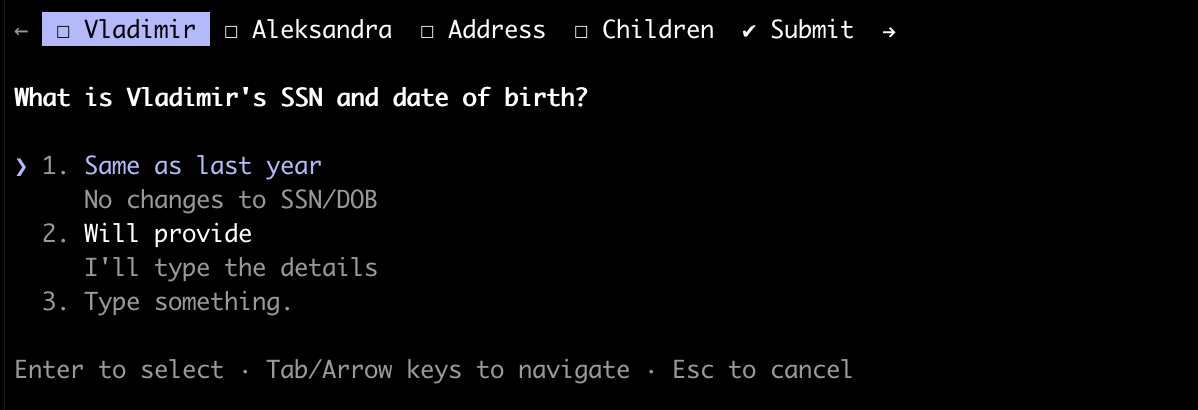
Here’s the final task.md (sensitive data redacted):
# Tax return

You're the Tax Professional, your task is to prepare tax return for me - Federal, NYS, NYC.

# Workflow

Some documents are in the current folder, the name describes its content. Use info from there. If something
is not clear, ask questions using the tool. Ask as many questions as possible in one session. The tax
return can be complicated - multiple Schedule C's, foreign assets etc - ask EVERYTHING.

For each document, like W-2 - parse it in a separate agent (as it might be big) and save essential data
into `<original-document-name>-summary.md`. For PDFs, if it's large don't read it directly, launch a
Python script to extract info. If `*-summary.md` already exists, use that instead.

Once file is complete and you know all the numbers, use them to generate actual PDFs and output them.

If you're not sure, ask questions via tool. But look at `answers.md` beforehand. Try to ask as many
questions as possible in a single session. Save answers to `answers.md` (or to
`COMMONSENSE_CLASSIFICATION_RULES.md` if it relates to business transaction classification) as soon as
you get them, so in the next run session you won't need to ask again.

IMPORTANT: Put only new info to `answers.md`, don't duplicate what you have in this file

# Output

Maintain `result.json` file where you keep data needed for printing final tax return for Fed, NYS and NYC.
Keep only the necessary data there (e.g. not the business revenue breakdown).

# Facts

Use these facts about us:

* Filing jointly
* Vladimir - W-2 and consulting income (CommonSense IT LLC, software development)
* Alexandra - consulting income (CommonSense IT LLC d/b/a Grossmargin, Financial Consulting)
* We use same LLC for consulting income, but it should be different Schedule C's
* We both want to maximize our SEP IRA contributions
* We used ECEP in W-2 in NY, not sure what it is exactly
* We have a home office, I calculated expenses as sqft of the room we use for office / total sq footage
  of the apartment x (rent + utilities). The total is $*****
* Alexandra will contribute $***** to SEP IRA, Vladimir will contribute $*****. Tell me if it's over the
  limits

# Missing documents

We still don't have documents from the bank and brokers with investment and interest income.
Assume we don't have this income.

# Calculating business income / expenses

See `COMMONSENSE_CLASSIFICATION_RULES.md` for detailed transaction classification rules. If you can't
classify the transaction, ask and update `COMMONSENSE_CLASSIFICATION_RULES.md` as you go.

Also print a summary for each of us, how much we made in total and expenses. Extract expenses that are not
100% deductible.

# Estimates

Estimates summary (all done from Mercury account).

Federal:
* $***** - Apr 9th, 2025
* $***** - Jun 10, 2025
* $***** - Sep 3, 2025
* $***** - Jan 7th, 2026

NYC:
* 11/07/25 - $***** (UBT)

NYS:
* 04/08/2025 - $*****
* 06/09/2025 - $*****
* 09/02/2025 - $*****
* 01/09/2026 - $*****

Also we have some overpayment from previous year, it should be in the documents.

# Other

Foreign accounts / holdings didn't change, use transcript from previous year. Also same address.
The whole thing took about 2 hours. And 5 clean slate runs (meaning I nuke the context, edit artifacts
from previous runs like answers.md, and improve task.md).
I have a Claude MAX subscription for $200/month. For this tax preparation task, the actual token cost was probably a few dozen dollars at most.
Compare that to CPA fees for a complex return like ours — easily $1300-2000+. Even if I factor in the time I spent iterating on prompts, the economics work out — assuming I can reuse the same prompt for many years.
I gave Claude Code our previous year’s tax return, and it used it heavily. That was a solid foundation — Claude could see exactly how we structured our filings before, which forms we used, and how we handled edge cases like foreign accounts and dual Schedule Cs.
My wife runs a financial consulting business and I consider myself a financial nerd. Before filing, I already knew what I wanted to optimize and how. For example, I knew that we need to separate income between my wife and me into different Schedule Cs to optimize pension plan contributions. Our financial hygiene was good — we never used business account for personal expenses and vice versa. For other people, the process may require more effort
After CC was done with filing, I asked it for advice on how to optimize taxes further. It gave me good advice about converting LLC into S-Corp and estimated pretty significant tax savings. However, it missed an important point that we want to maximize retirement savings. After pressuring CC, it re-adjusted the estimate to a more conservative one.
In general, I would not yet follow any strategic advice blindly — ask questions and pressure for details.
I still haven’t actually filed taxes.
Banks hasn’t prepared investment & interest income reports, so I would need to run the agent once again.
But more important, moving data from result.json to PDF forms turned out to be hard. I’m still wrestling with Claude Code —
it’s making progress, but sometimes it misses fields. Probably it’ll
require a separate effort (is there an API for tax forms?).
And I don’t want to print and physically mail them. To file electronically, I need to involve a CPA who has access to special software (IRS doesn’t give API access to everybody), or take a look at TurboTax to see if I can easily import the data I have.
Last mile is always the hardest.
Yes. This is the way forward.
Even if I end up hiring a CPA for the actual filing, I’ll keep using this approach for everything else — tax planning, quarterly estimates, deduction strategies. Having an AI that understands your full financial picture and can run scenarios is incredibly useful.
Next up: I’m planning to use the same approach to file taxes for our C-Corp.